
Manage water maps, boundaries, and restricted zones together

Update once. Keep the app in sync.

Waters on a tablet. Map editor

Draw boundaries, restricted zones, and points of interest in the club dashboard. Once published, the same map is available in the app, with GPS and saved map data for use on the go.

Map editor · Restricted zones · Water regulations

For water warden & board

One reliable map instead of competing versions

Maintain water boundaries and restricted zones centrally, then publish reviewed maps. The app and club administration use the same released version.

Water warden

End outdated maps and plans scattered across tools.

  • Lease boundaries, closed areas, and key points in one place instead of PDFs, paper maps, and chat groups.
  • Update the water map directly so restricted zones and rules stay current.
  • Show anglers at any time where they may fish and which areas are closed.
  • Draw, edit, and merge areas flexibly without tedious tracing on paper.

For water wardens and beat leads.
Board

Clear responsibilities. Traceable approvals.

  • Publish waters only after ownership and lease documents have been checked.
  • Prepare maps internally and make them visible to the intended users only after release.
  • Restrict waters to members when they should not appear in the public guest-ticket shop.
  • One shared data basis for inspection, the club app, and guest tickets instead of conflicting map versions.

For boards and data protection officers.

Map editor

Waters, restricted areas, and useful points on one map

Manage lakes, rivers, restricted zones, points of interest, and publication in one map editor instead of maintaining a separate file for the app.

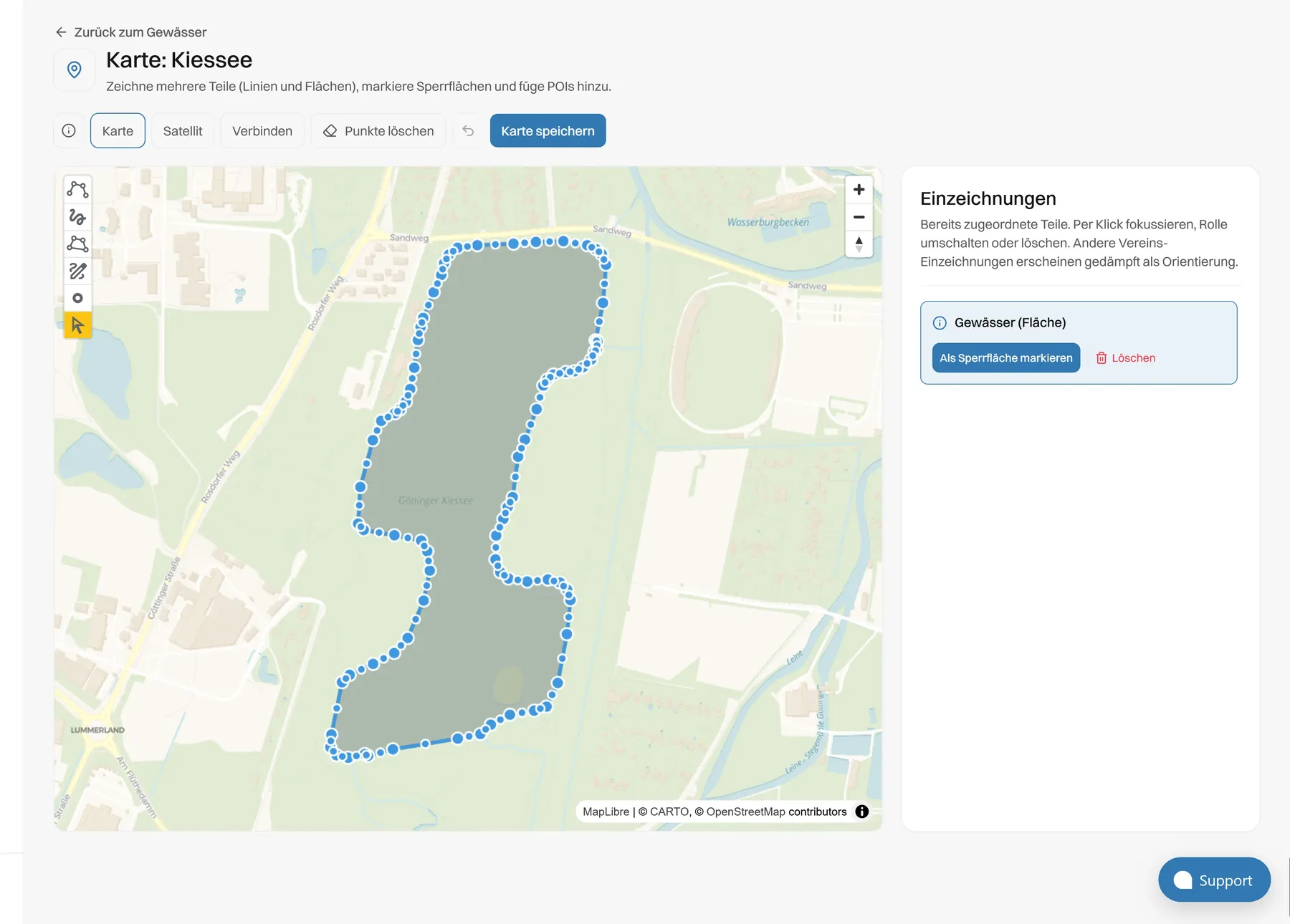
Map editor: draw the water area at Kiessee
Club map with water, restricted zone and POIs

Layer 01

Your beat on the map. Captured precisely.

Draw your waters directly on the map: lakes as areas, rivers as lines. Complex watercourses can be traced freehand, split into sections, and edited flexibly. All geometries are stored directly with the water they belong to.

  • Capture lakes as areas and rivers as lines, including multi-part shapes
  • Draw freehand, join sections, and remove regions with precision
  • Switch between street and satellite view in the editor
Lake
Area, including multi-part
River
Line, including freehand
Tools
Join, edit, delete regions

What you draw, members see in the app, not as an extra PDF.

Regulations

Keep the map and water regulations together

Attach water and fishing regulations to each water. Species-specific closed seasons, size limits, and catch limits are managed in the relevant fish settings.

At the beat

Rules and notes directly at the water.

Inform members about important requirements directly on each water. Whether access, boat use, warnings, or waste: store notes where they are needed. Manage general club rules centrally and add water-specific rules where they differ.

  1. 01

    Notes at the water

    Keep all important information on the water itself instead of hiding it in separate PDF files.

  2. 02

    Central rules, local additions

    Manage club-wide defaults centrally and add water-specific rules when needed.

  3. 03

    Available directly in the app

    Once a water is published, members can see the related notes in the app.

Water warden with a map on the bank
From dashboard to the water

Plan on desktop. Orient at the water.

Create and manage your water maps in the club dashboard, then release them to the app after review. Members get the same up-to-date boundaries, restricted zones, and key landmarks at the water, including GPS and offline-saved map data.

  1. 01

    Draw

    Capture water boundaries, restricted zones, and key places directly in the dashboard. Use street or satellite view and edit your map flexibly in one central place.

  2. 02

    Release

    Review your details and decide when a water is published. Keep it internal or members-only when needed.

  3. 03

    Use it at the water

    The released water map is ready in the app. GPS supports orientation on site, and saved map data works even without mobile reception.

Pins

Consistent map symbols make directions clearer

Pins use defined categories such as parking, landing stages, and warnings. Optional descriptions help identify important locations clearly.

  • 01Parking
  • 02Boat pier
  • 03Warning
  • 04General info
  • 05Accessible
  • 06Restricted-zone info
  • 07Toilets
  • 08Waste disposal
  • 09Emergency
  • 10Rest area
Who uses it

One water map. Three perspectives.

Data & beat

Your club remains in control of its water data

Water data is maintained in the club’s platform and hosted in Germany. Permissions and approvals support a traceable publishing process.

Hosting in Germany

Water geometry and regulations are hosted on servers in Germany.

Security & GDPR

Permissions by office

The water manager updates the map, the board approves it, and wardens use the published information.

Our stance

Proof before live

Waters can be prepared internally and published only after the intended review.

Read the process

DPA for clubs

Data processing is governed by an agreement, while the club remains responsible for its water data.

Request a DPA

Questions from the boathouse

Trace the water in the editor - lakes as areas, rivers as lines, with freehand drawing where needed. Paper plans are not digitised automatically; afterwards, you manage the map centrally rather than maintaining a separate personal copy.

See the map editor and restricted zones in action

  • Map editor
  • Restricted zones
  • GDPR · hosting DE